• Hello all dear costomer

    Welcome to my shop

  • My shop is a brand shop

    We are new Generation

  • This is My shop

    My shop have a lot of new mode has arrived now

Showing posts with label Technology. Show all posts

Sunday, December 25, 2016

Monitor

A computer monitor or a computer display is an electronic visual display for computers. A monitor usually comprises the display device, circuitry, casing, and power supply. The display device in modern monitors is typically a thin film transistor liquid crystal display (TFT-LCD) or a flat panel LED display, while older monitors used a cathode ray tubes (CRT). It can be connected to the computer via VGA, DVI, HDMI, DisplayPort, Thunderbolt, LVDS (Low-voltage differential signaling) or other proprietary connectors and signals.
Originally, computer monitors were used for data processing while television receivers were used for entertainment. From the 1980s onwards, computers (and their monitors) have been used for both data processing and entertainment, while televisions have implemented some computer functionality. The common aspect ratio of televisions, and computer monitors, has changed from 4:3 to 16:10, to 16:9.

Advantages and disadvantages of information systems


Advantages and disadvantages of information systems:

Advantages

Communication – with help of information technologies the instant messaging, emails, voice and video calls becomes quicker, cheaper and much efficient.
Globalization and cultural gap – by implementing information systems we can bring down the linguistic, geographical and some cultural boundaries. Sharing the information, knowledge, communication and relationships between different countries, languages and cultures becomes much easier.
Availability – information systems has made it possible for businesses to be open 24×7 all over the globe. This means that a business can be open anytime anywhere, making purchases from different countries easier and more convenient. It also means that you can have your goods delivered right to your doorstep with having to move a single muscle.
Creation of new types of jobs – one of the best advantages of information systems is the creation of new and interesting jobs. Computer programmers, Systems analyzers, Hardware and Software developers and Web designers are just some of the many new employment opportunities created with the help of IT.
Cost effectiveness and productivity – the IS application promotes more efficient operation of the company and also improves the supply of information to decision-makers; applying such systems can also play an important role in helping companies to put greater emphasis on information technology in order to gain a competitive advantage. IS has a positive impact on productivity, however there are some frustrations can be faced by systems users which are directly linked to lack of training and poor systems performance because of system spread.


disadvantages

Unemployment and lack of job security – implementing the information systems can save a great deal of time during the completion of tasks and some labor mechanic works. Most paperwork’s can be processed immediately, financial transactions are automatically calculated, etc. As technology improves, tasks that were formerly performed by human employees are now carried out by computer systems. For example, automated telephone answering systems have replaced live receptionists in many organizations or online and personal assistants can be good example also. Industry experts believe that the internet has made job security a big issue as since technology keeps on changing with each day. This means that one has to be in a constant learning mode, if he or she wishes for their job to be secure.
Dominant culture – while information technology may have made the world a global village, it has also contributed to one culture dominating another weaker one. For example it is now argued that US influences how most young teenagers all over the world now act, dress and behave. Languages too have become overshadowed, with English becoming the primary mode of communication for business and everything else.
Security issues – thieves and hackers get access to identities and corporate saboteurs target sensitive company data. Such data can include vendor information, bank records, intellectual property and personal data on company management. The hackers distribute the information over the Internet, sell it to rival companies or use it to damage the company’s image. For example, several retail chains were targeted recently by hackers who stole customer information from their information systems and distributed Social Security numbers and credit card data over the Internet.
Implementation expenses – to integrate the information system it require pretty good amount of cost in a case of software, hardware and people. Software, hardware and some other services should be rented, bought and supported. Employees need to be trained with unfamiliar information technology and software.
Information systems contribute to the efficient running of organizations. Information systems are showing the exponential growth in each decades. Today’s information technology has tremendously improved quality of life. Modern medicine has benefited the most with better information system using the latest information technology. By understanding and learning what advantages and disadvantages it can bring, we have to try, believe and put an effort with our best to make that existing advantage much better and navigate the disadvantages to have a less impact on organizations and society.


What can you do on the Internet?


What can you do on the Internet?

  • browse websites
  • send and receive email
  • download media files, eg Mp3s or video files
  • watch streamed video, eg BBC iPlayer, YouTube etc
  • check your bank balance and make payments
  • buy goods from online shops
  • access educational material from your school’s Virtual Learning Environment (VLE)
  • create, store, edit and share your documents using web-based applications, eg Google Docs
  • interact with friends on social networking sites, eg Bebo, MySpace, Facebook etc
  • write a blog
  • sign-up to forums and discuss topics that interest you with like-minded individuals
  • game with friends
  • instant message family and friends
  • share photos and videos
  • complete free tutorials covering a wide range of subjects


Thursday, December 22, 2016

flas for computer


Image result for flash computer

Flash, a popular authoring software developed by Macromedia, is used to create vector graphics-based animation programs with full-screen navigation interfaces, graphic illustrations, and simple interactivity in an antialiased, resizable file format that is small enough to stream across a normal modem connection. The software is ubiquitous on the Web, both because of its speed (vector-based animations, which can adapt to different display sizes and resolutions, play as they download) and for the smooth way it renders graphics. Flash files, unlike animated but rasterized GIF and JPEG, are compact, efficient, and designed for optimized delivery.
Known as a do-it-yourself animation package, Flash 4 gives Web designers the ability to import artwork using whatever bitmap or illustration tool they prefer, and to create animation and special effects, and add sound and interactivity. The content is then saved as file with a .SWF file name extension. (The letters SWF stand for 'Shockwave Flash.')
Web users with Intel Pentium or Power Macintosh processors can download Flash Player to view Flash content, which performs across multiple browsers and platforms. Flash is lauded for being one of the Web's most accessible plug-in. According to an independent study cited by Macromedia, 89.9 percent of Web users already have Flash Player installed.

Monday, December 19, 2016

SPEAKER

This time of year I get a lot of questions about building gaming computers as gifts for the holiday season. Whether they’re intended as gifts for the kids, for the spouse or a little bit of self gifting love, 'tis the season to cut loose a little bit and indulge the gamer in our lives with a nice new piece of hardware to dig into 2017’s top titles. There’s no such thing as a “Best Gaming PC”, but rather a lot of options for ‘optimal,’ and budget plays a big role in what kind of PC we’re talking about building. Here we’re going to look at the budget class of gaming computer. It wasn’t that long ago that a good friend reached out to me for advice building a computer for his young son who was just getting his toes wet in PC gaming. As a parent, it can be hard to justify an expensive gaming computer when you don’t know if your child is going to move on to a completely different interest a year down the road. At the same time, we want to give them a good experience so they can enjoy the games they want to play. While the build below is suited for anyone wanting gaming grade hardware on a modest budget, I’d be lying if I said I didn’t have my friend’s ten-year-old in mind when I wrote this.

PRITER

In computing, a printer is a peripheral which makes a persistent human-readable representation of graphics or text on paper or similar physical media.[1] The world's first computer printer was a 19th-century mechanically driven apparatus invented by Charles Babbage for his difference engine.[2] The first commercial printers generally used mechanisms from electric typewriters and Teletype machines The demand for higher speed led to the development of new systems specifically for computer use. In the 1980s were daisy wheel systems similar to typewriters, line printers that produced similar output but at much higher speed, and dot matrix systems that could mix text and graphics but produced relatively low-quality output. The plotter was used for those requiring high quality line art like blueprints. The introduction of the low-cost laser printer in 1984 with the first HP LaserJet, and the addition of PostScript in next year's Apple LaserWriter, set off a revolution in printing known as desktop publishing. Laser printers using PostScript mixed text and graphics, like dot-matrix printers, but at quality levels formerly available only from commercial typesetting systems. By 1990, most simple printing tasks like fliers and brochures were now created on personal computers and then laser printed; expensive offset printing systems were being dumped as scrap. The HP Deskjet of 1988 offered the same advantages as laser printer in terms of flexibility, but produced somewhat lower quality output (depending on the paper) from much less expensive mechanisms. Inkjet systems rapidly displaced dot matrix and daisy wheel printers from the market. By the 2000s high-quality printers of this sort had fallen under the $100 price point and became commonplace. The rapid update of internet email through the 1990s and into the 2000s has largely displaced the need for printing as a means of moving documents, and a wide variety of reliable storage systems means that a "physical backup" is of little benefit today. Even the desire for printed output for "offline reading" while on mass transit or aircraft has been displaced by e-book readers and tablet computers. Today, traditional printers are being used more for special purposes, like printing photographs or artwork, and are no longer a must-have peripheral. Starting around 2010, 3D printing became an area of intense interest, allowing the creation of physical objects with the same sort of effort as an early laser printer required to produce a brochure. These devices are in their earliest stages of development and have not yet become commonplace.

SCANNER

In computing, an image scanner—often abbreviated to just scanner, although the term is ambiguous out of context (barcode scanner, CAT scanner etc.)—is a device that optically scans images, printed text, handwriting or an object and converts it to a digital image. Commonly used in offices are variations of the desktop flatbed scanner where the document is placed on a glass window for scanning. Hand-held scanners, where the device is moved by hand, have evolved from text scanning "wands" to 3D scanners used for industrial design, reverse engineering, test and measurement, orthotics, gaming and other applications. Mechanically driven scanners that move the document are typically used for large-format documents, where a flatbed design would be impractical. Modern scanners typically use a charge-coupled device (CCD) or a contact image sensor (CIS) as the image sensor, whereas drum scanners, developed earlier and still used for the highest possible image quality, use a photomultiplier tube (PMT) as the image sensor. A rotary scanner, used for high-speed document scanning, is a type of drum scanner that uses a CCD array instead of a photomultiplier. Non-contact planetary scanners essentially photograph delicate books and documents. All these scanners produce two-dimensional images of subjects that are usually flat, but sometimes solid; 3D scanners produce information on the three-dimensional structure of solid objects. Digital cameras can be used for the same purposes as dedicated scanners. When compared to a true scanner, a camera image is subject to a degree of distortion, reflections, shadows, low contrast, and blur due to camera shake (reduced in cameras with image stabilization). Resolution is sufficient for less demanding applications. Digital cameras offer advantages of speed, portability and non-contact digitizing of thick documents without damaging the book spine. As of 2010 scanning technologies were combining 3D scanners with digital cameras to create full-color, photo-realistic 3D models of objects.[1] In the biomedical research area, detection devices for DNA microarrays are called scanners as well. These scanners are high-resolution systems (up to 1 µm/ pixel), similar to microscopes. The detection is done via CCD or a photomultiplier tube.

Modem

Any interest in these proprietary improvements was destroyed during the lengthy introduction of the 28,800 bit/s V.34 standard. While waiting, several companies decided to release hardware and introduced modems they referred to as V.FAST. In order to guarantee compatibility with V.34 modems once the standard was ratified (1994), the manufacturers were forced to use more flexible parts, generally a DSP and microcontroller, as opposed to purpose-designed ASIC modem chips.
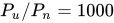
The ITU standard V.34 represents the culmination of the joint efforts. It employs the most powerful coding techniques including channel encoding and shape encoding. From the mere four bits per symbol (9.6 kbit/s), the new standards used the functional equivalent of 6 to 10 bits per symbol, plus increasing baud rates from 2,400 to 3,429, to create 14.4, 28.8, and 33.6 kbit/s modems. This rate is near the theoretical Shannon limit. When calculated, the Shannon capacity of a narrowband line is {\text{bandwidth}}\times \log _{2}(1+P_{u}/P_{n}), with P_{u}/P_{n} the (linear) signal-to-noise ratio. Narrowband phone lines have a bandwidth of 3,000 Hz so using P_{u}/P_{n}=1000 (SNR = 30 dB), the capacity is approximately 30 kbit/s.[3]
Without the discovery and eventual application of trellis modulation, maximum telephone rates using voice-bandwidth channels would have been limited to 3,429 baud × 4 bit/symbol = approximately 14 kbit/s using traditional QAM.

Memory Card

In the early 1940s, memory technology mostly permitted a capacity of a few bytes. The first electronic programmable digital computer, the ENIAC, using thousands of octal-base radio vacuum tubes, could perform simple calculations involving 20 numbers of ten decimal digits which were held in the vacuum tube accumulators.
The next significant advance in computer memory came with acoustic delay line memory, developed by J. Presper Eckert in the early 1940s. Through the construction of a glass tube filled with mercury and plugged at each end with a quartz crystal, delay lines could store bits of information in the form of sound waves propagating through mercury, with the quartz crystals acting as transducers to read and write bits. Delay line memory would be limited to a capacity of up to a few hundred thousand bits to remain efficient.
Two alternatives to the delay line, the Williams tube and Selectron tube, originated in 1946, both using electron beams in glass tubes as means of storage. Using cathode ray tubes, Fred Williams would invent the Williams tube, which would be the first random-access computer memory. The Williams tube would prove more capacious than the Selectron tube (the Selectron was limited to 256 bits, while the Williams tube could store thousands) and less expensive. The Williams tube would nevertheless prove to be frustratingly sensitive to environmental disturbances.
Efforts began in the late 1940s to find non-volatile memory. Jay Forrester, Jan A. Rajchman and An Wang developed magnetic core memory, which allowed for recall of memory after power loss. Magnetic core memory would become the dominant form of memory until the development of transistor-based memory in the late 1960s.
Developments in technology and economies of scale have made possible so-called Very Large Memory (VLM) computers.[2]
The term "memory" when used with reference to computers generally refers to Random Access Memory or RAM.


mouse Button

Optical mice rely entirely on one or more light-emitting diodes (LEDs) and an imaging array of photodiodes to detect movement relative to the underlying surface, eschewing the internal moving parts a mechanical mouse uses in addition to its optics. A laser mouse is an optical mouse that uses coherent (laser) light
The earliest optical mice detected movement on pre-printed mousepad surfaces, whereas the modern LED optical mouse works on most opaque diffuse surfaces; it is usually unable to detect movement on specular surfaces like polished stone. Laser diodes are also used for better resolution and precision, improving performance on opaque specular surfaces. Battery powered, wireless optical mice flash the LED intermittently to save power, and only glow steadily when movement is detected.

Hard disk drive


A hard disk drive (HDD), hard disk, hard drive or fixed disk[b] is a data storage device used for storing and retrieving digital information using one or more rigid rapidly rotating disks (platters) coated with magnetic material. The platters are paired with magnetic heads, usually arranged on a moving actuator arm, which read and write data to the platter surfaces.[2] Data is accessed in a random-access manner, meaning that individual blocks of data can be stored or retrieved in any order and not only sequentially. HDDs are a type of non-volatile memory, retaining stored data even when powered off.
Introduced by IBM in 1956,[3] HDDs became the dominant secondary storage device for general-purpose computers by the early 1960s. Continuously improved, HDDs have maintained this position into the modern era of servers and personal computers. More than 200 companies have produced HDDs historically, though after extensive industry consolidation most current units are manufactured by Seagate, Toshiba, and Western Digital. As of 2016, HDD production (in bytes per year) is growing, although unit shipments and sales revenues are declining. The primary competing technology for secondary storage is flash memory in the form of solid-state drives (SSDs), which have higher data-transfer rates, higher areal storage density, better reliability,[4] and much lower latency and access times.[5][6][7][8] While SSDs have higher cost per bit, SSDs are replacing HDDs where speed, power consumption, small size, and durability are important.[7][8]
The primary characteristics of an HDD are its capacity and performance. Capacity is specified in unit prefixes corresponding to powers of 1000: a 1-terabyte (TB) drive has a capacity of 1,000 gigabytes (GB; where 1 gigabyte = 1 billion bytes). Typically, some of an HDD's capacity is unavailable to the user because it is used by the file system and the computer operating system, and possibly inbuilt redundancy for error correction and recovery. Performance is specified by the time required to move the heads to a track or cylinder (average access time) plus the time it takes for the desired sector to move under the head (average latency, which is a function of the physical rotational speed in revolutions per minute), and finally the speed at which the data is transmitted (data rate).
The two most common form factors for modern HDDs are 3.5-inch, for desktop computers, and 2.5-inch, primarily for laptops. HDDs are connected to systems by standard interface cables such as PATA (Parallel ATA), SATA (Serial ATA), USB or SAS (Serial attached SCSI) cables. (Prepared by Lay SengKheang)